This semester I worked on a variety of different graphics-oriented projects. These included:
Section 1: Improving My Game Engine
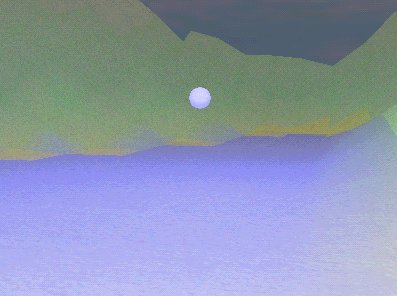
I took the basic game engine, which includes a wide variety of features (you can find information about it here), and allowed the map to be deformed in any way. I also textured and colored it based on height. This process brought up a number of interesting issues which included finding the best way to draw triangles where the texture was changing very often. The best way I found to do this was a multiple-pass renderer (one pass per texture). I tightened the inner loop as much as possible and kept track of my progress as I did so (see Section 4: Performance Analysis). A screenshot taken right after a bullet was fired is shown at right. Please click on the image to see a larger version.
 Section 2: MapMaker: The MapMaking Program
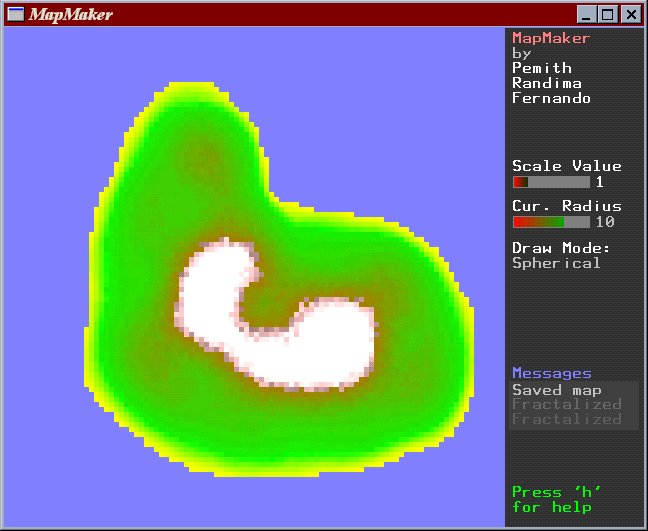
In order to make maps for the game engine, I wrote a program called MapMaker. In addition its basic purpose, MapMaker also taught me how to deal with 2D imaging in OpenGL and how to work with fonts. Essentially what it does it is shows the map as a grid of large squares, color coded to represent height and texture (blue = water, yellow = beach, green = grass, brown = rock, white = snow). As the user clicks on an area of land, the land is raised. In this way the user is able to elevate land and design a relief map. I wrote a brief GUI for the program so that I would be able to quickly and efficiently design a user interface that is OpenGL but not GLUT reliant. It includes simple facilities for basic buttons, windows, and status bars. A sample screen from the program is pictured at right. Please click on the image to see a larger version. MapMaker has the following features:
Compiling in UNIX and porting to it from Microsoft Developer Studio involved a number of subtle and interesting points. Because there were so many considerations, I compiled everything into the first section of a Microsoft Word document called project.doc which can be found here. You can also get the document in Adobe PDF format here.
I learned a great deal about OpenGL and graphics performance in general from the game engine development. In particular, I learned about ways to optimize a walk-through type of game engine and how to work with the graphics to achieve higher and higher frame rates. This was a long process and each step of the way I recorded changes, so that in the end I was able to write up a large Word document with details. These can all be found in the second part of project.doc which can be found here. You can also get the document in Adobe PDF format here.
 Section 5: VR Applications in the CAVE Environment
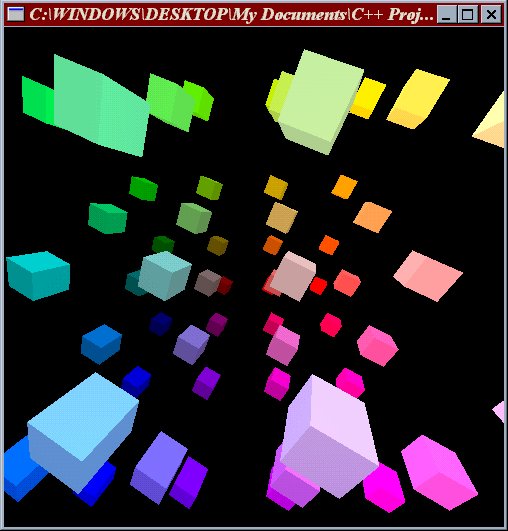
In addition, I applications that run in the Theory Center's CAVE environment. Unfortunately I was not able to get screen shots from the SGI machine, so instead I have shown a screenshot of a prospective and very simple application, which is a walk-through of a color cube made up of numerous small cubes. Please click on the picture for a larger version. The first program I did was a simple test program with some rotating cubes to check if I was following the general skeleton of Workspace correctly. After that, I went straight to the ambitious port of the island walk-through engine described in Part I. Fortunately, I was able to succeed, except that for some reason I was not able to make texturing work. I still have not figured out why this is but I have heard from graduate students that texturing can cause strange problems. Must explore in the future... I also worked on an asteroid field simulation wherein the user can shoot at asteroids using the wand. This exposed me to a more interactive scenario and I learned how to extract the wand and eye coordinates and use them in a useful and meaningful way. Right now the graphics are relatively simple but adding a few texture maps (once I figure out the problem with them) and lighting effects should make the program into a simple but interesting game that can be used for demonstration purposes.
I also read on a variety of different subjects form the OpenGL Developer's Guide. These subjects included the various buffers (depth, stencil, accumulation, and other extra OpenGL buffers) and how to use them effectively. I also read more about the various color modes and about details on the lighting model and texturing model. The purpose of all this was to gain a good understanding of how exactly OpenGL works and to use this knowledge to try and speed up my game engine further. I thought of some interesting techniques but I either didn't have time to try them or I found that they really didn't help performance as much as I thought they would. The OpenGL Developer's Guide is an informative and easy-to-read book that I would recommend to beginning and intermediate OpenGL users because of its comprehensive, simple, but informative style.
I plan to continue my work by finish up a solid VR demonstration application complete with textures and hopefully sounds next semester. I will also continue to work on the game engine I have developed this summer and hopefully complete a solid game or at least get even closer to that.
I would like to thank Professors Bruce Land and Richard Gillilan for their help, guidance, and advice.
I really appreciate the time you both spent with me talking about graphics, virtual reality, and reality.
Please direct any questions or comments about anything on this page or on this site to me at: prf3@cornell.edu